
White Melamine Plywood
A clean, ready-to-use white melamine panel for cabinet boxes, closets, shelving, pantries, built-ins, and other finished interior projects.
View Product
Enter your part sizes to estimate how many 4x8 plywood sheets you need, account for kerf and waste, and generate a clean cut list before you order material.

This plywood cut list calculator helps you estimate how many plywood sheets you need for your project, how much waste to expect, and the order in which to cut your parts. Simply enter your part sizes and quantities, and the calculator provides a practical, easy-to-follow cut list so you can plan confidently before buying plywood.
Berta Store · Project planning tools
Enter your part sizes and quantities. This plywood cut list calculator checks rectangular fit, grain direction and saw kerf, then estimates your sheet count with your selected material allowance.
Enter dimensions in inches, such as 30.5 or 30 1/2. Include any oversize you need for later trimming; these are the dimensions the fit model uses.
Check these details before calculating:
Your cut list estimate
Material estimate, not an optimized cutting plan. The model uses basic rectangular placement and may require more sheets than a skilled layout. Review actual sheet size, grain, defects and your cutting plan before ordering. Spare area does not guarantee suitably sized replacement parts.
Largest parts first for review. This is not a cutting sequence.
What are you building? Compare these starting points, then choose the appropriate thickness, finish and quantity on the product page. Confirm dimensions and availability before ordering.
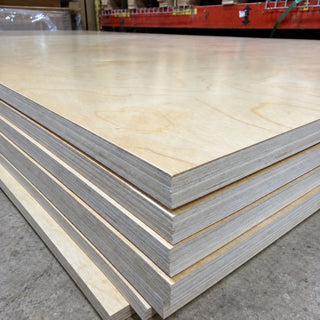
Factory-finished options for cabinet interiors, shelving and built-ins.
View product options ↗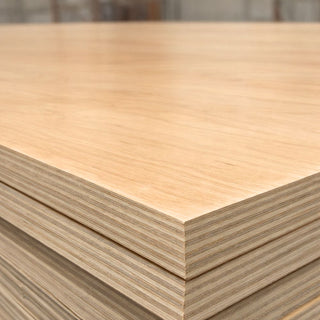
Prefinished maple options for visible cabinet and furniture surfaces.
View product options ↗
Compare unfinished panels for cabinet parts and furniture components.
View product options ↗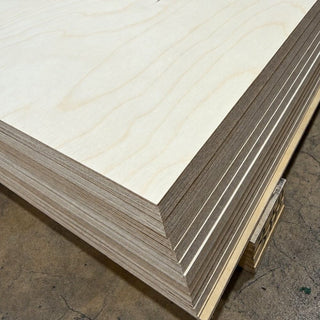
An unfinished panel to consider for paint or compatible laminates. Check surface preparation and finish requirements.
View product options ↗Product links open in a new tab so your estimate stays available here. They do not automatically select a variant or add the estimated quantity to your cart. These are project starting points, not confirmed material specifications.
Part fit: every part must fit the usable sheet in an allowed orientation. A basic rectangular-placement model separates parts with the selected kerf. It tries a small set of size orders and split directions; it does not find or guarantee the minimum possible sheet count.
Grain: part length is the grain direction you specify. “Follows sheet length” locks that axis to the sheet length; “follows sheet width” locks it across the sheet. Rotation is available only when grain direction is not required. Mixed grain rules require separate estimates.
Kerf and edge trim: kerf is reserved between separated pieces, not outside factory sheet edges. Edge trim reduces both sheet dimensions before placement. Any part larger than the resulting usable dimensions is rejected.
Extra material allowance: the requested extra area equals total part area × your selected percentage. The order estimate is the larger of the fitted sheet count and the sheet count needed to cover part area, modeled kerf and that extra area. Existing offcuts count toward this area allowance. For grain matching or guaranteed spare parts, add those parts explicitly to the list.
Example: three 30 × 80 in parts require three 48 × 96 in sheets in this model, even though their combined area is less than two full sheets. The unused area also covers a 10% part-area allowance; it does not provide a spare 30 × 80 in part.
Finished your sheet estimate? Compare ready-to-use melamine plywood for cabinet boxes, closets, shelving, built-ins, and furniture. Choose the surface and core that best match your project before ordering.
A clean, ready-to-use white melamine panel for cabinet boxes, closets, shelving, pantries, built-ins, and other finished interior projects.
View Product
Premium white melamine on both sides over a 13-ply Baltic Birch core for strong screw holding, clean machining, cabinets, closets, shelving, and millwork.
View Product
Wood-look melamine on both faces adds a warm decorative finish to cabinets, closets, shelving, built-ins, and furniture without on-site finishing.
View Product
Smooth light gray melamine on both sides over an 11-ply poplar core for modern cabinet boxes, closets, shelving, built-ins, and storage systems.
View ProductOne of the most common mistakes in cabinet and furniture projects isn’t bad cutting — it’s bad planning. Parts get sketched on paper, numbers get rounded in your head, and by the time you’re halfway through cutting, you realize you’re short a sheet. Or worse, you overbought and now have extra plywood taking up shop space. That’s exactly why Berta built this plywood cut list calculator.
This tool is meant for real projects — cabinets, closets, built-ins, shelving, and furniture — where you need a clear idea of how many sheets to buy before you load the truck.
The calculator is intentionally simple. You enter each part you plan to cut — width, height, and quantity — and the tool totals everything for you. There’s no complicated nesting diagram or CNC logic here. Instead, it focuses on the same math experienced woodworkers do by hand, just faster and without mistakes.
The calculator uses standard plywood sheet sizes, starting with the most common 4×8 sheet (48×96 inches). You can also select 5×5 or 5×10 sheets if you’re working with Baltic birch or oversized panels. Based on your inputs, the calculator estimates total material required and shows a clean, readable cut list so you know what to cut first.
Two things cause most material shortages on real jobs: waste and kerf.
No matter how careful you are, plywood never cuts at 100% efficiency. Grain direction, awkward dimensions, trimming allowances, and small mistakes all create offcuts. That’s why the calculator includes a waste buffer, typically between 5–12%, which reflects real-world shop conditions instead of perfect theory.
Kerf matters too. Every saw blade removes material with each cut. A standard 1/8" kerf doesn’t sound significant until you multiply it across dozens of cuts. The calculator slightly reduces usable sheet area to account for this, helping prevent that last-minute shortage.
If you’re building cabinets, closet systems, wall panels, or furniture, this calculator gives you a reliable starting point before you order plywood. Contractors use it to estimate jobs more accurately, and DIY builders use it to avoid extra trips and wasted material. It doesn’t replace experience — it supports it.
Planning tip: The result already includes the waste allowance you selected above. For projects with grain matching, visible faces, defects, or uncertain field dimensions, consider adding additional material before ordering.
For delivery details, pickup options, and shipping minimums, visit our FAQ page. And to explore all available plywood, MDF, and hardware, head to the Berta Store homepage:
Yes. You can adjust the sheet size to match common formats such as 4×8 sheets or other custom plywood dimensions.
The cut list is designed for planning and estimating purposes. It provides a clear cutting sequence, but final layout adjustments may be needed based on your equipment and cutting preferences.
The calculator provides an estimated layout and waste calculation. For precise results, users should account for saw kerf, edge trimming, and safety margins when cutting.
Not currently. The calculator estimates sheet quantity based on your part sizes, kerf, and waste allowance, then organizes your cut list by size. It does not generate a nesting diagram or determine the most efficient physical placement of parts on each sheet.